Set up image choices once. When editing a post, click a preview to choose a quote author, badge or layout. WordPress stores the choice value, just like a regular select. Works with free ACF.
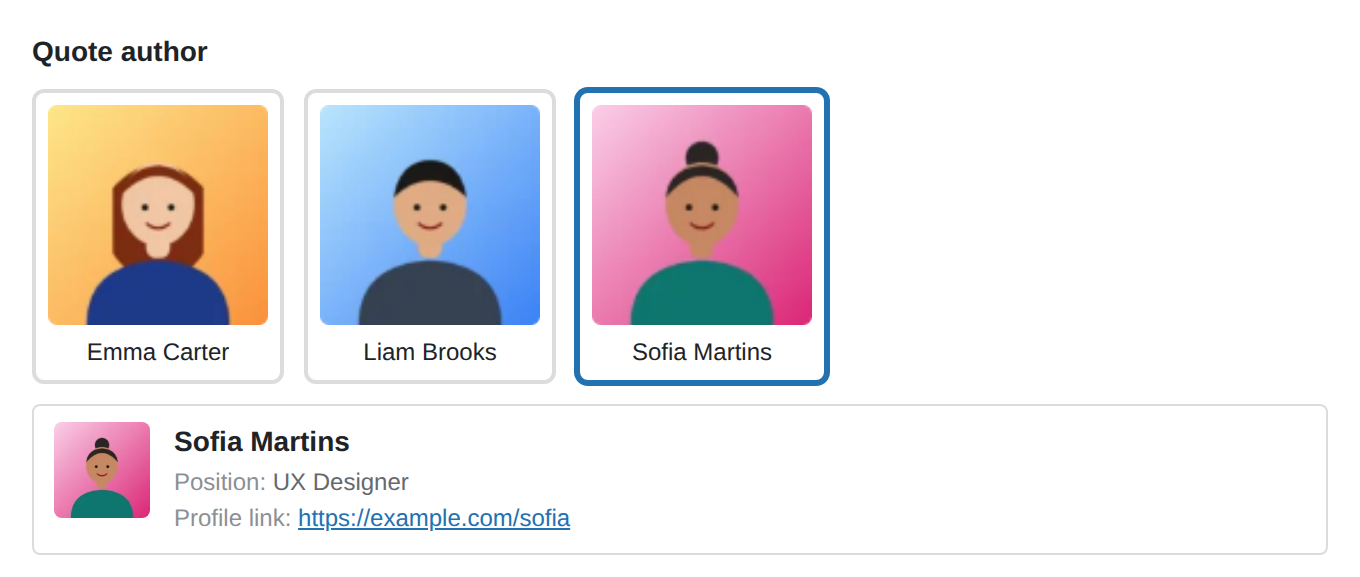
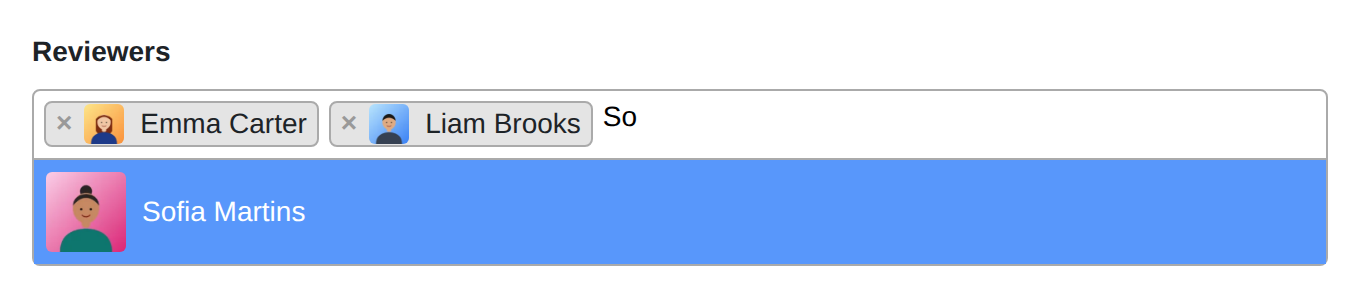
In this quote block example, editors choose the author from image cards and reviewers from a dropdown with thumbnails.
Quote author fieldFor a short list of choices
Click an author’s portrait. The selected card is highlighted, and its details appear below.
Sofia has a position and profile link in this example. Your quote block template can use these details.
Reviewers fieldFor a longer list
Open the list and start typing a name. Searching for “So” shows Sofia Martins. The thumbnail helps identify her in the results.
With multiple selection enabled, editors can add several people. Emma and Liam are already selected here.
Where to use Image Select
Set up an Image Select field wherever editors regularly choose from the same set of options.
Authors and experts
Choose a person by their portrait and use their name and position in a quote block.
Product badges
Give editors a set of approved badges to choose from on a product page.
Page layouts
Show a thumbnail of each layout so editors can see what they are choosing.
// free version
What’s included in the free version
Image Select works with free ACF, ACF PRO and Secure Custom Fields. Set up your choices in the field settings and choose what data the template receives.
Author choices in the ACF field settingsExtra fields for every author
Build your set of choices
Pick images from the Media Library. Give each choice a label and a value, such as an author’s name and slug.
Add extra fields
Create Position and Profile link fields, then fill them in for each author. These details will be available with the selected choice.
Choose a return format
Return the value, label, image ID or URL. Choose Array to get the portrait, name and extra fields together.
Start with one field
Add Image Select to a field group or change an existing Select field to Image Select. Keep the choice values and add images, then check the field in the post editor.
// compatibility
ACF compatibility
ACF field settings
Type
Image Select
Choice
Sofia Martins
Details
Portrait and position
Image Select
Image Select · result
Author
Sofia Martins
Position
UX Designer
Value
sofia-martins
ACF and Secure Custom Fields
Image Select works with free ACF, ACF PRO and Secure Custom Fields. Add the field to a group and choose image cards or a dropdown with thumbnails.
Repeated blocks
Group
Expert quotes
Field
Author · Image Select
Location
Inside Repeater
Image Select
Image Select · result
Quote 1
Author · Sofia
Quote 2
Author · Emma
Selection
Per block
Nested fields
Use the field inside Repeater, Flexible Content, Group and ACF Blocks. Each quote block can have its own author. Repeater and Flexible Content require ACF PRO.
Regular Select
Label
Sofia Martins
Value
sofia-martins
Selection
Saved in the post
Image Select
Image Select · result
Label
Sofia Martins
Value
sofia-martins
Added
Author portrait
Switching from Select
Changing a Select field to Image Select carries over its choices and default value. Add images to the same values to keep the selections in existing posts.
Image Select Pro
The same author can appear in several posts with different quotes. Pro lets editors change the quote in each post while the portrait and position come from the author’s settings.
A quote for each post
Make the Quote extra field editable in posts. After choosing an author, editors get a text field for the current post.
Sofia can have different quotes in an interview and a case study.
Default values
Set default text in the choice settings. Editors can use it or write their own text in an individual post.
The author’s portrait and position still come from the shared set of choices.
PHP for your template
Copy ready-to-paste PHP from the field settings. It accounts for the field name, return format, multiple selection and extra fields.
For nested fields, the code uses get_sub_field().
Pro license
For one site: $10 per year or $50 for a lifetime license. Checkout is handled by Freemius. After purchase, you’ll receive a license key and a link to the Pro version.
Free ACF is enough for Image Select itself. ACF PRO and Secure Custom Fields are also supported. Repeater and Flexible Content availability depends on your ACF edition.
What is stored in the database?
The free version stores the selected choice value, such as sofia-martins, or an array of values for multiple selection. Pro also stores changes to editable extra fields for each post.
How do I display the selected author?
Choose the Array return format in the field settings. Your template can use get_field() to get the image, label and extra fields of the selected choice. Pro provides ready-to-copy PHP in the settings.
Does editing a quote in Pro change it in every post?
Editing the quote in a post affects that post. Author details from the choice settings, such as the portrait and position, are shared by posts that use that author.
Can I switch an existing Select field?
Yes. Change the field type to Image Select and add images to its choices. Choice values and the default value are carried over, keeping existing post selections available.
This site uses technical cookies and Cloudflare services. Learn more in the Privacy Policy.