WebP on upload
Choose the compression quality. WordPress keeps the attachment ID, so blocks and galleries that use it still display the image.
RowanWeb Media Converter & Cleaner
Convert new JPG and PNG uploads to WebP. Restore originals from the trash if needed. Pro can convert your existing library and find images that are no longer in use.
// examples
Compare two versions of the same photo, then see what changes in the media library and where the original goes.
In this example, WebP is 62% smaller. Both files are 1200 × 900 pixels.

lampa.jpg165 KB

lampa.webp62 KB
WordPress keeps the same attachment ID. Pages that use that ID still show the photo.
Ceramic base with a fabric shade.
Attachment ID  248 → 248
Main file      lampa.jpg → lampa.webp
Thumbnails     WebP
In this example, the original JPG is kept in the trash separately from the WebP that the site uses.
Original after conversion.
Default retention: 30 days.
lampa.jpg.// free version


Turn it on in the WebP tab to convert new JPG and PNG uploads and their thumbnail sizes.
The same tab shows whether GD or Imagick can write WebP. You can also adjust image quality there.
The plugin converts a sample of JPG and PNG files to estimate savings. The files in your library stay as they are.
// before you start
Before batch conversion or cleanup in Pro, make sure you can recover files and that the plugin can see the pages that use them.
| Check | When it matters | What to do |
|---|---|---|
| Backup |
Batch conversion changes files and links in the database. |
Back up the database and the |
| Available disk space |
WebP copies and originals in the trash take up space at the same time. |
Check available disk space. Use the WebP tab to estimate the size of the converted files from a sample. |
| Pages outside the sitemap |
Private pages and landing pages absent from your sitemap can still use images. |
Review these pages separately. Add publicly accessible pages that are missing from the sitemap to the scan settings. |
| Cleanup candidates |
An image may be used in a custom template or by an external service. |
Review the candidate list and move only the files you are ready to remove to the trash. |
Choose what you want to tackle: new uploads, large existing images, or files you no longer use.
Batch conversion runs in four stages. The plugin shows which stage is in progress.
Agency case study · plugin interface shown in Russian
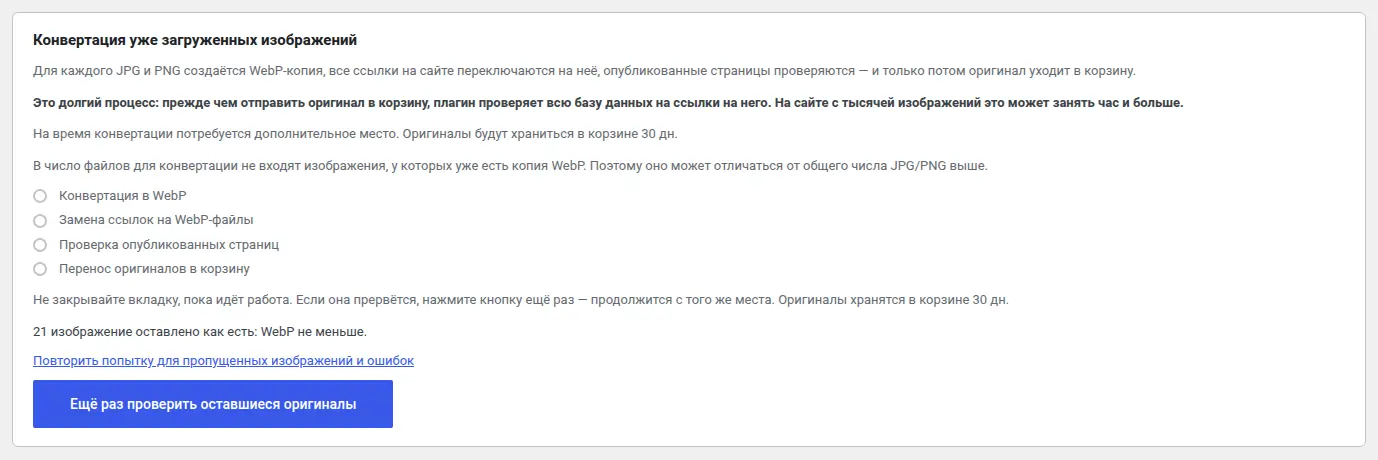
The plugin compares the combined size of the main file and thumbnails. If the WebP set does not save space, it keeps the original format. In the case study shown above, 21 images were skipped for this reason.
Convert existing images to WebP or find files that are no longer in use. After processing, Pro checks for new image loading errors.
Results on an agency website
| Measurement | Before | After |
|---|---|---|
| Media library | 2.80 GB | 1.40 GB |
| Images across 9 pages | 95.8 MB | 33.8 MB |
| Total size of 9 pages | 133 MB | 67 MB |
The pages were measured in a browser with caching disabled and scrolled to the bottom.
| Page | Images before | Images after |
|---|---|---|
| Projects listing | 31.8 MB | 6.0 MB |
| Homepage | 5.4 MB | 1.4 MB |
| Service landing page | 11.7 MB | 2.1 MB |
| Project D | 2.8 MB | 3.6 MB |
Project D displayed full-size images. At the selected quality, the WebP files used on that page were larger.
Pro creates WebP copies for eligible JPG and PNG files and updates references in posts, custom fields, product galleries, and supported page builders.

The plugin checks the database, pages in your sitemap, and associated stylesheets. Review the candidates you want to remove. Pro rechecks each file before moving it to the trash.
Pro compares image loading errors before and after the operation. If a new error appears, restore the affected file from the report. You can also undo an entire cleanup.
For one site: $20 per year or $120 for a lifetime license. Checkout is handled by Freemius. After purchase, you’ll receive a license key and a link to the Pro version.
Before you install and run your first conversion.
Enable WebP on upload to convert new JPG and PNG files. You can also estimate savings for files already in the library for free. Batch conversion of existing files is available in Pro.
Open the plugin’s WebP tab. The Server panel shows whether GD or Imagick can write WebP. If support is missing, ask your hosting provider whether it can be enabled.
Format conversion itself keeps the pixel dimensions. WordPress can still resize large uploads and generate thumbnails according to its settings.
Files remain in the plugin trash for 30 days by default. You can change the retention period in Settings and restore a file while it remains in the trash.
Activate it separately on each site where you need it. Network-wide activation is unavailable.